|
BC-250 - Board Preparation Hardware Preparation 1. Remove the metal bracket and backplate located at either end of the board (5 screws in total) 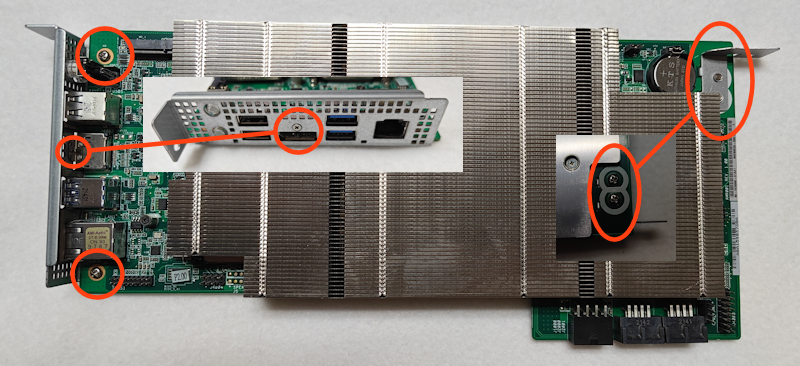 Note the tiny M2-3mm screw above the DisplayPort connector. 2. Set the two jumpers next to the CMOS battery Set the right jumper (nearest the battery) to the right side for 5-10 seconds. This will clear the CMOS. Then move it back to the left as shown. 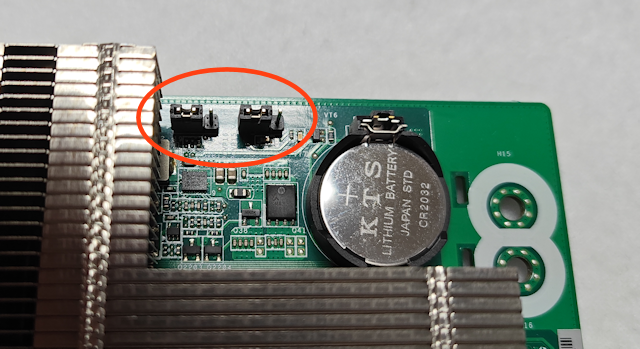 3. Install the M.2 SSD into the 2280 M.2 slot (both NVMe and SATA drives supported) 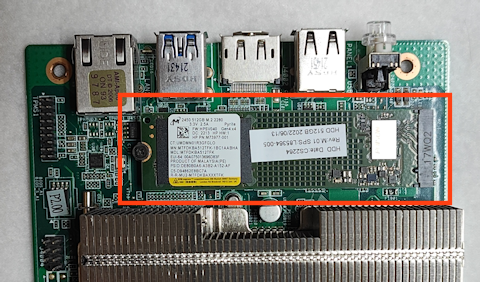 Remove screw, insert drive at an angle, then screw down. Software Preparation 1. Download the Custom BC-250 BIOS files to a FAT32-formatted USB flash drive 2. Download and install the Balena Etcher software - Alternatively, you can use Rufus if you prefer it 3. Download the Bazzite ISO file 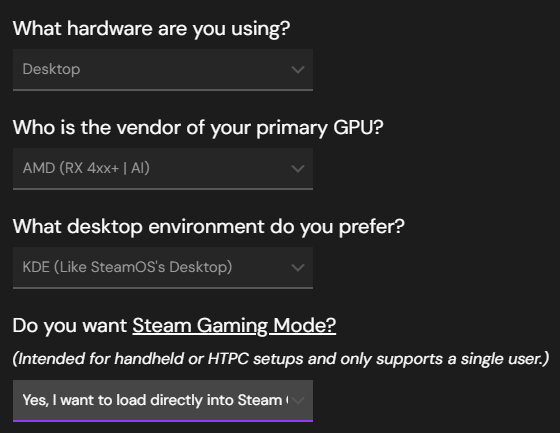 These are the recommended download selections. 4. Using Balena Etcher (or Rufus), write the Bazzite image to a 16GB or larger USB flash drive - If you want to use the same flash drive from step 1, hold off on this step for now |
Copyright © 2026 Pocket Adventures.com